
The world is digitalized. Classrooms, general lifestyle, exams and the preparations that lead to them have brought AI to the center stage. Students are relying heavily on AI. There’s a mass of information online that constantly needs to be browsed, absorbed, and filtered down to what’s relevant. AI has made all of that easy. All it needs is a prompt, and an ocean’s worth of information on the internet is brought to you concisely, which makes student life extremely easy.
The introduction of a tool so powerful has made the life of students studying abroad manageable, with fewer late nights spent figuring out what to study or skip. This blog will help you understand 25+ types of AI tools for students; it is the first step to using the right one for the right cause.
Top AI Tools You Should Know: An Overview
| Need | Best AI Tool | Ideal Use Case |
| Homework | ChatGPT | Explaining concepts, drafting answers and brainstorming ideas |
| Research | Perplexity | Finding quick, source-backed information |
| Notes | Otter.ai | Recording lectures and turning them into notes |
| Flashcards | Quizlet | Revising key facts and memorising topics |
| Presentations | Gamma | Creating polished slides quickly |
| Coding | GitHub Copilot | Helping with code suggestions and debugging |
| Grammar | Grammarly | Improving clarity, tone and accuracy |
| Math | Photomath | Solving equations step by step |
| Mind Maps | MindMeister | Organising ideas visually |
| Productivity | Notion AI | Planning, organising and summarising work |
What Are AI Tools for Students?
AI tools for students are platforms that use artificial intelligence to help them collect information on a particular subject, assist in learning, writing, revision, and even organisation. AI tools have now become so advanced that they can even create PowerPoint presentations. You put in a prompt; they work by analysing the prompt, gathering information from the internet, and providing quick and useful information.
AI tools include AI study tools, AI productivity apps and AI learning apps. Each of them caters to a different purpose and works differently. These have become a practical support system for students, helping them manage university study and create theses as well.
Why Are Students Using AI More Than Ever?
One of the main reasons students are moving toward using AI is its efficiency, making it a faster and smarter way to get their work done. A McKinsey 2025 report said that the use of AI is already reaching many work and learning environments.
The main reason for using AI tools for students is to speed up learning and research and improve accessibility for different types of learning modes and needs. AI tools are well known for reducing repetitive tasks, supporting multilingual students, and improving accessibility for different learning needs. This is especially helpful for students studying abroad and who need tools that shorten the educational barriers required to succeed in life.
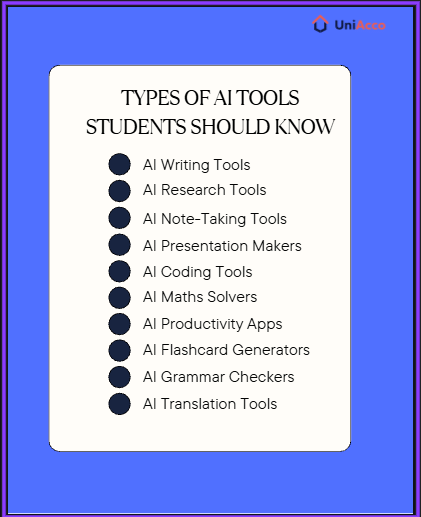
Types of AI Tools Students Should Know
AI Writing Tools
AI writing tools are used to generate ideas, provide clarity, write essays, and help rephrase content as needed. This tool should be treated as a suggestive tool and should not replace authentic research and writing.
AI Research Tools
Relied on by literature students and those working towards a dissertation who need background research on a specific topic. AI research tools are designed to cut down the time taken to search, summarise sources and understand complex material.
AI Note-Taking Tools
It’s an app you keep on your phone, and it takes down your lecture for you. It helps you understand, transcribe speeches, and turn rough notes into clean structures. This is an app students often open to clear doubts about the lecture.
AI Presentation Makers
AI presentation makers are apps that convert ideas and content into well-designed PowerPoint-like presentations. They are useful for group projects, when you need to present an idea and in seminars.
AI Coding Tools
AI coding tools support students by making programming tasks easier. They suggest code, spot errors, and explain the logic behind it.
AI Maths Solvers
This tool breaks down the equation step by step, explains how it arrived at the answer, and makes difficult sums easier to solve. This is highly helpful for revision, checking your answers and even homework.
AI Productivity Apps
AI productivity apps are designed to help students work and plan better. From scheduling to organising deadlines, they enable them to stay on track and get the work done. They are ideal for those balancing lectures, needing a plan to work properly or managing university and part-time work together.
AI Flashcard Generators
AI flashcard generators turn information into smart cards, which helps students learn and remember facts and numbers much better. They work wonders in remembering definitions, formulas and points where you might get stuck.
AI Grammar Checkers
The only difference between what you want to say and what you’ve actually said is punctuation; AI grammar checkers fix it for you. They improve spelling, writing errors, and sentence flow. Useful in emails, reports, and essays, they are most often used by university students.
AI Translation Tools
Translating a language that is hard to understand into a language you’re most comfortable with, AI translation tools do it for you. It helps you translate key ideas and communicate more effectively.
Just as choosing the right AI tool can make studying easier, finding the right student accommodation can transform your university experience. Explore verified and affordable student homes with UniAcco, including fully furnished studios, en-suite rooms, and shared apartments with all-inclusive bills, modern amenities, and flexible booking options near top universities.
🔍 Explore Student Accommodation25+ Best AI Tools for Students
Best AI Writing Tools for Students
ChatGPT
ChatGPT is your question-and-answer friend, which helps you brainstorm, provide a layout, explain difficult concepts, and refine responses. It acts like a human 24/7; you can have conversations with it regarding any topic, and it helps with research and fine-tuning an idea.
Pricing: Free plan available. Paid plans start at around $20/month.
Key features: Brainstorming, outlining, summarising, rewriting, question answering, coding help and study support.
Pros: Highly flexible, easy to use and useful across almost every subject.
Limitations: Is known to provide inaccurate information, so students should always verify facts before using it in assignments.
Best student use cases: Essay planning, homework support, revision, coding help and exam preparation.
ChatGPT is a great starting point, but it isn’t the only AI tool worth trying. Exploring free alternatives for research, revision, note-taking, or coding? Read this Quora thread.
ChatGPT is a great place to begin, but it’s far from the only AI tool available to students. Whether you’re looking for free AI tools for research, revision, note-taking, writing, or coding, this Quora discussion shares recommendations and experiences from users who have explored a variety of alternatives.

Claude
Claude is an AI assistant known for conversational chat, coding and data analysis. This app can help students handle long documents and produce thoughtful, natural-sounding writing. Many students use it for feedback on essays, reading-heavy tasks and deeper analysis.
Pricing: Free plan available with usage limits. The paid plans start at around $20/month.
Key features: Long-context writing help, document analysis, summarisation and editing support.
Pros: Chosen for its nuanced writing and large files.
Limitations: Students on the free plan might not get the best of its features. Only available on the paid plan.
Best student use cases: Essay refinement, report analysis, reading summaries and project drafting.
Grammarly
Grammarly is the app that students are recommended when they need to fine-tune their writing. It helps them correct punctuation and tone and rewrite full sentences. Academic colleges suggest using Grammarly when writing personal statements.
Pricing: A free plan exists. But for advanced features, students may have to purchase the premium version costing $12 per month.
Key features: Grammar checks, tone suggestions, rewriting support and clarity improvements.
Pros: Simple, fast and ideal for editing.
Limitations: It focuses on polishing rather than generating ideas or full drafts.
Best student use cases: Proofreading essays, checking emails, improving clarity and correcting grammar.
Quill Bot
Quill Bot contains a paraphraser, grammar checker and a summarizer. It helps students and professionals create content quickly, fix errors and helps rewrite text. It is often used to tighten up assignments or make sentences sound free-flowing and humanly written.
Pricing: Free plan available. Premium plan available at $19.95 per month.
Key features: Paraphrasing, summarising, grammar checking and citation tools.
Pros: Helpful for rewriting and simplifying content.
Limitations: It should never be used to disguise copied work.
Best student use cases: Rewording notes, refining drafts and summarising long text.
Jasper
Jasper is an AI platform specifically built for marketing teams to create content, maintain brand voice, and manage campaigns. Brands can upload their brand guides, and it will create an output that matches the company style.
Pricing: No free plans available; the creator plan is priced at $39 per month, while the pro plan is $59 per month.
Key features: Content generation, templates, tone control and brand-style writing.
Pros: Produces structured, polished writing quickly.
Limitations: It is less student-focused than some other AI writing tools and may feel more content-marketing oriented.
Best student use cases: Drafting project content, generating ideas and organising written work.
Best AI Research Tools
Perplexity
Perplexity is an AI tool that, with cited sources, provides students with accurate starting points for essays, sometimes even completely written articles, that sound human. However, not all information can be provided accurately, so fact-checking and additional research may be required.
Pricing: Free plan available. Pro plans are priced at $20, and Max is $200 per month (ideal for groups).
Key features: Source-backed search, summarisation, follow-up questions and web-based research.
Pros: Fast, citation-friendly and easy to fact-check.
Limitations: It still needs human review, especially for academic work.
Best student use cases: Research, source discovery and topic overview.
Elicit
Elicit is an AI Research Assistant designed to automate literature reviews, extract key information from scientific papers, condense main findings into summaries, and find relevant academic studies to help students with their research.
Pricing: Users can use the free plan, while those needing more features can get the paid plans starting from $49 per month.
Key features: Paper search, evidence extraction, literature review support and research summaries.
Pros: Excellent for academic research and reviewing studies.
Limitations: Best suited to research-heavy subjects rather than general study tasks.
Best student use cases: Dissertation research, literature reviews and academic paper analysis.
Also Read: How to Write a Dissertation: A Complete Student Guide
Consensus
Consensus is designed for students who need reliable research rather than general internet results. It draws from a database of 200 million+ peer-reviewed studies, helping you locate relevant evidence, compare published findings, and quickly grasp the main conclusions from trusted academic literature.
Pricing: It can cost approx $0 to $45 per month, depending on the plan.
Key features: Research-backed answers, academic paper search and evidence summaries.
Pros: Strong for science-based and evidence-led topics.
Limitations: Less useful for broad and non-academic questions.
Best student use cases: Science assignments, thesis research and evidence checking.
Scite
Scite does not use generic search engines; instead, it uses machine learning that helps scientists, students, and academic scholars evaluate science literature. It is used to analyse the context of citations and shows whether later literature supports, contrasts, or simply discusses the published paper.
Pricing: Free trial available. Paid plans are priced at $20 per month.
Key features: Citation context, smart reference checking and research discovery.
Pros: Great for checking source quality and credibility.
Limitations: More advanced than some students may need for day-to-day use.
Best student use cases: Academic writing, source verification and research evaluation.
Semantic Scholar AI
Similar to Consensus, Semantic Scholar AI is a search engine and research tool that indexes over 200 million scientific and scholarly papers covering fields related to humanities, medicine, and computer science.
Pricing: Free to use.
Key features: Academic search, paper recommendations, citation tracking and research summaries.
Pros: Free and highly useful for academic research.
Limitations: The interface may feel more research-heavy than beginner-friendly.
Best student use cases: Literature searches, academic exploration and source discovery.
Best AI Note-Taking Tools
Notion AI
Notion AI is an assistant inside the Notion app. You can write, search across your documents and add automation to your repetitive tasks. It connects to your pages, databases and external apps such as Google Drive or Slack. You can chat with your assistant, and it can give you answers related to your notes.
Pricing: Students will have to purchase the $20 business plan to use the features.
Key features: Note summaries, brainstorming, task management and organisation.
Pros: Great for combining notes, deadlines and planning in one workspace.
Limitations: It works best if you already enjoy structured note-taking.
Best student use cases: Class notes, revision planning and project organisation.
RemNote
This app is specifically built for students, researchers and lifelong learners – this is an all-in-one note-taking and knowledge management app. This app uses Spaced Repetition by combining hierarchical outlining, PDF annotation and bidirectional (sending signals two ways) linking.
Pricing: A free plan is available. For paid versions, you can either purchase an $8-a-month plan that is billed annually or $10 per month, which is billed monthly.
Key features: Linked notes, flashcards, spaced repetition and knowledge organisation.
Pros: Excellent for long-term learning and revision.
Limitations: It is quite complex and may take time to learn properly.
Best student use cases: Exam revision, medical study and memorisation-heavy subjects.
Otter AI
Otter AI is designed for students who are keen listeners in the classroom but still need notes to go back to during revision. This app listens to meetings and lectures, and turns them into live notes and summaries.
Pricing: You get a Free basic plan. Pro is $16 per month, and Business is $30 per month.
Key features: Transcription, summaries, speaker identification and search.
Pros: Saves time and helps capture lecture details accurately.
Limitations: Accuracy can drop in noisy environments or with strong accents.
Best student use cases: Lectures, seminars and group discussions.
Gemini Notebook
Gemini Notebook is a study tool where students can upload their documents, YouTube videos, Google Drive and more and chat with an AI that will give you answers based on the documents you uploaded. It helps you build study guides, briefing documents, FAQs and more.
Pricing: Free to use.
Key features: Source-based summaries, question answering and study support.
Pros: Useful for turning course materials into manageable revision content.
Limitations: Works best when you upload strong, well-organised source material.
Best student use cases: Revision, lecture recap and document-based study.
Best AI Presentation Tools
Gamma
Gamma is an online content creation tool that helps students create presentations, documents, and web pages by entering a prompt, and the app builds responsive and visually clean layouts.
Pricing: Gamma is free with branding, while paid plans start at $9–$12/month (Plus), $18–$25/month (Pro), and $90–$100/month (Ultra).
Key features: Slide generation, layout design, AI writing support and export options.
Pros: Fast and visually impressive.
Limitations: Customisation may be more limited than traditional slide software.
Best student use cases: Class presentations, project pitches and seminar slides.
Canva Magic Design
Canva Magic Design is an AI tool within Canva that instantly creates custom, multi-page templates, social media posts, presentations or even videos. All you have to do is type in the prompt or upload an image, and the AI does the job for you.
Pricing: A limited free period is available; to unlock the full offering, you will have to purchase the paid subscription worth $15 to $18 per month.
Key features: AI design suggestions, templates, slide creation and visual editing.
Pros: Easy for beginners and strong for visual work.
Limitations: Some premium design elements are locked behind paid access.
Best student use cases: Presentations, posters, infographics and coursework visuals.
Tome
Tome is an AI-powered presentation tool that helps students create story-driven slides, decks, text, layouts and images quickly. Students can also attach PDF’s, Word documents and text files that turn raw notes into formatted slides.
Pricing: A free tier with basic features. Paid options include the Pro plan at $16 per month billed annually, or $20 per month billed monthly.
Key features: AI slide generation, storytelling layouts and multimedia support.
Pros: Good for creating engaging presentations with little effort.
Limitations: May not suit students who prefer full design control.
Best student use cases: Project presentations, pitch decks and visual storytelling.
Beautiful.ai
Beautiful.ai is a cloud-based presentation software that uses AI and smart templates to create design slides. Key features include auto-aligning content, an AI deck generator using prompts, and team brand control.
Pricing: A free 14-day trial is available, with paid plans starting at $12 per month.
Key features: Smart templates, automatic formatting and presentation design support.
Pros: Clean, modern and easy to use.
Limitations: Less flexible than fully manual design tools.
Best student use cases: Essays with slides, academic talks and group presentations.
Best AI Coding Tools
GitHub Copilot
About the tool: GitHub Copilot is an AI coding assistant that autocompletes code, generates entire functions and chats with developers inside text editors. It is one of the most useful tools for students learning programming or working on technical projects.
Pricing: Copilot free includes limited chat and agent usage, while paid plans start at $10 per month.
Key features: Code suggestions, debugging help and programming support.
Pros: Speeds up coding and helps students learn by example.
Limitations: It can suggest incorrect or inefficient code.
Best student use cases: Programming assignments, debugging and learning new languages.
Windsurf
Windsurf can help you write, edit, debug, and understand code across more than 70 programming languages and 40 integrated development environments (IDEs). If you regularly switch between different coding tools or projects, Windsurf offers a flexible alternative to traditional AI coding assistants.
Pricing: Offers a free individual tier with unlimited single-line and multi-line code autocomplete. The Pro plans range at ~$15–20/month.
Key features: Autocomplete, debugging support and code explanations.
Pros: Useful for beginners and experienced coders alike.
Limitations: Advanced features may vary depending on the platform.
Best student use cases: Coursework, coding practice and project development.
Replit AI
Replit AI is built into the Replit coding environment. Students can turn text ideas into fully built apps, letting them write code faster with autocomplete and fix bugs without any manual work. It is useful for collaborative coding and quick experimentation.
Pricing: The starter plan is free with limited daily credits. The paid plan (Replit Core) costs $20 to $25 per month, billed annually or monthly.
Key features: Code generation, debugging, app building and collaborative development.
Pros: Easy to use in-browser and good for quick projects.
Limitations: Best suited to students already working in Replit’s ecosystem.
Best student use cases: Coding practice, coursework and beginner projects.
Best AI Maths Tools
Wolfram Alpha
Wolfram Alpha is an AI and computational tool from Wolfram Research. It combines large language models with symbolic computation, knowledge bases and computational language. It helps students solve equations, check answers and understand complex problems, and is especially valuable for STEM subjects.
Pricing: Wolfram Alpha Pro starts at $5 per month billed annually, with student software starting at $135 per year; commercial or industrial licenses cost more.
Key features: Equation solving, step-by-step computation and data analysis.
Pros: Very accurate and academically useful.
Limitations: Can feel technical for students who want simpler explanations.
Best student use cases: Maths homework, physics problems and data analysis.
Photomath
Photomath is a mobile app that lets students scan maths problems and see step-by-step explanations for equations, sums and more, from arithmetic to advanced calculus. It is especially useful for checking work, understanding how an answer is reached, and building confidence with difficult topics. Used as a learning aid rather than a shortcut, it can help students practise independently while still developing their own problem-solving skills.
Pricing: Photomath is free to use for basic maths problems. The upgraded version, Photomath Plus, costs $9.99 per month or $69.99 per year.
Key features: Camera input, step-by-step solutions and visual explanations.
Pros: Easy to use and very beginner-friendly.
Limitations: It should support learning, not replace it.
Best student use cases: Homework help, revision and checking calculations.
Symbolab
Symbolab is an AI-driven maths solver and educational platform designed to break down a wide range of mathematics topics into steps. This can range from pre-algebra to trigonometry up to university-level calculus, physics and even chemistry.
Pricing: Offers a free plan that covers basic problem solving and limited steps. The Symbolab Pro subscription starts at $9.85 per month, $32.95 billed semi-annually, or $39.95 billed annually.
Key features: Step-by-step solving, equation support and graphing.
Pros: Strong for detailed maths breakdowns.
Limitations: Some step-by-step solutions require a paid plan.
Best student use cases: Maths revision, worked examples and practice questions.
Mathway
Mathway is an online maths problem solver and also comes in the form of a mobile app. Students can speak about the problem, type or even take a picture of it. It helps by instantly generating answers and provides optional step-by-step solutions.
Pricing: Mathway is free to use for basic problem solving. For a detailed step-by-step guide, Mathway Premium subscriptions are needed. It costs $9.99 per month, and the annual plan costs $39.99 billed annually.
Key features: Problem solving, graphing and step-by-step explanations.
Pros: Broad subject coverage and simple to use.
Limitations: Full explanations may require payment.
Best student use cases: Maths homework, revision and self-checking.
Best AI Flashcard Tools
Quizlet AI
Quizlet AI turns class notes, PDFs, or lecture slides into flashcards, study guides, or practice tests for students to learn efficiently. It also comes with an AI tutor, Q-Chat, that enables learning through conversations.
Pricing: Quizlet costs $35.99 when billed annually or $7.99 when billed monthly.
Key features: Flashcard generation, practice tests and revision modes.
Pros: Great for active recall and exam prep.
Limitations: Best results depend on the quality of the notes you upload.
Best student use cases: Vocabulary, definitions, formulas and exam revision.
Knowt
Knowt is a free, AI study tool that converts notes, PDF’s, PowerPoint presentations and videos into flashcards, practice tests and study guides.
Pricing: It is completely free to use.
Key features: Auto-generated flashcards, quizzes and note summaries.
Pros: Saves time and supports repeated practice.
Limitations: May not suit students who prefer traditional study methods.
Best student use cases: Flashcard revision, quick quizzes and note review.
Also Read: List Of Best Flashcard Apps That Will Help You Study Better
Best AI Productivity Apps
Motion AI
Motion AI is a project management tool that automatically helps students plan their day out. From daily schedules to prioritising tasks and time blocks off the calendar, it helps students stay on track and achieve more in their day. It is great for those who are habitual procrastinators or end up missing deadlines quite often.
Pricing: Motion AI costs between $19 and $69 per month, depending on the individual or team plan.
Key features: Task scheduling, smart planning and calendar management.
Pros: Reduces planning stress and helps students stay on track.
Limitations: It is more useful for students with busy schedules than for casual use.
Best student use cases: Deadline management, daily planning and time blocking.
Reclaim AI
Reclaim AI is a calendar and time management app made for Google Calendar and Microsoft Outlook. It automatically schedules your tasks, meetings, breaks and makes a note of your habits. It keeps rearranging your tasks when problems or new events come up.
Pricing: Reclaim AI offers a free Lite tier per single user. There are 3 paid per-seat tiers, costing $10/seat monthly, $15/seat monthly for business and $22/seat monthly for enterprises.
Key features: Smart scheduling, calendar blocking and syncing and routine planning.
Pros: Helps students protect study time.
Limitations: Needs a well-maintained calendar to work properly.
Best student use cases: Revision planning, routines and workload management.
Goblin Tools
Goblin Tools is a collection of small web and mobile utility apps built to help neurodivergent people manage everyday tasks by breaking down big, complex tasks into simple steps, clarifying duties, and turning messy thoughts into clear plans.
Pricing: Free to use.
Key features: Task breakdown, tone adjustment and planning support.
Pros: Very handy for managing stress and complexity.
Limitations: It is more of a support tool than a full productivity suite.
Best student use cases: Assignment planning, overwhelm management and task organisation.
Best AI Tools by Subject
| Field of Study | Recommended AI Tools | How They Can Help |
| Engineering | ChatGPT, Wolfram Alpha, GitHub Copilot, Perplexity, Gemini Notebook | Explain engineering concepts, solve calculations, support coding, and assist with technical research. |
| Medicine | Perplexity, Elicit, Consensus, Gemini Notebook, Quizlet AI | Find peer-reviewed research, revise medical topics, create flashcards, and strengthen long-term recall. |
| Law | Claude, ChatGPT, Perplexity, Gemini Notebook, Grammarly | Review lengthy legal texts, summarise case law, support legal research, and improve writing clarity. |
| Business | ChatGPT, Claude, Gamma, Canva Magic Design, Motion AI | Prepare presentations, organise projects, draft reports, develop ideas, and manage coursework more efficiently. |
| Humanities | Claude, ChatGPT, Perplexity, Gemini Notebook, Otter AI | Support essay writing, analyse sources, organise lecture notes, and prepare for seminars and discussions. |
| Computer Science | GitHub Copilot, Windsurf, Replit AI, ChatGPT, Wolfram Alpha | Write and debug code, understand algorithms, troubleshoot programming issues, and strengthen technical skills. |
ChatGPT vs Gemini vs Claude vs Perplexity vs Microsoft Copilot
| Feature | ChatGPT | Gemini | Claude | Perplexity | Copilot |
| Best for | General-purpose AI support, writing, brainstorming and study help. | Google users, multimodal tasks and everyday productivity. | Long-form writing, analysis and handling large documents. | Research, fact-finding and source-backed answers. | Microsoft 365 users, workplace productivity and document support. |
| Writing | Strong and flexible, especially for drafts, rewrites and ideas. | Good for everyday writing, though sometimes less nuanced. | Excellent for polished, natural-sounding long-form writing. | Useful for concise summaries, but not the strongest creative writer. | Solid for business-style writing and quick drafts. |
| Research | Good for broad research support, but facts need checking. | Good for general search and quick answers. | Useful for analysing uploaded documents, though not research-first. | Best of the five for research, citations and source checking. | Decent for workplace research, especially inside Microsoft apps. |
| Best student use cases | Essays, revision, brainstorming, coding and homework help. | Research summaries, note help, presentations and study support. | Editing assignments, analysing readings and drafting polished responses. | Finding credible sources, literature reviews and fact-checking. | Summarising documents, managing coursework and productivity in Office apps. |
| Ease of use | Very easy. | Easy, especially for Google users. | Easy to use, though best for writing-heavy tasks. | Very easy for search-style queries. | Easy for Microsoft users. |
25+ Ready-to-Use AI Prompts for Students
Research
- “Explain [topic] in simple terms and give me the key points I should know.”
- “Summarise the main arguments for and against [topic].”
- “Find credible sources on [topic] and give me a short overview of each.”
- “Help me turn this research question into a clear thesis statement.”
- “What are the most important trends or findings in [subject]?”
Essay
- “Help me create an essay outline on [topic].”
- “Give me three strong introduction ideas for an essay on [topic].”
- “Rewrite this paragraph to sound more natural and academic.”
- “Suggest a stronger conclusion for this essay.”
- “Check this draft for clarity, flow and grammar.”
Presentation
- “Turn these notes into a 5-slide presentation outline.”
- “Give me a catchy title for a presentation on [topic].”
- “Suggest simple talking points for each slide.”
- “Help me make this presentation more engaging.”
- “Summarise this topic in a way that works well for slides.”
Revision
- “Quiz me on [topic] one question at a time.”
- “Summarise this chapter into revision notes.”
- “Tell me the difference between these two concepts.”
- “Give me the most important points to remember for this topic.”
- “Create a quick revision plan for my exam in [timeframe].”
Flashcards
- “Turn these notes into flashcards with questions and answers.”
- “Make 10 flashcards from this chapter.”
- “Create simple revision cards for [topic].”
- “Turn these definitions into memorisable flashcards.”
- “Test me using these flashcards one by one.”
Coding
- “Explain this code in simple terms.”
- “Find the error in this code and fix it.”
- “Write a basic version of [function/task] in [language].”
- “Help me understand what this code does line by line.”
- “Suggest a cleaner way to write this code.”
Exam Prep
- “Make me a study timetable for my exam in [subject].”
- “Give me the most likely exam questions on [topic].”
- “Create a last-minute revision checklist.”
- “Explain this topic as if I have 10 minutes before the exam.”
- “Test me with short-answer practice questions.”
Language Practice
- “Help me practise writing more formal English.”
- “Correct this paragraph and explain the mistakes.”
- “Give me common phrases I can use in academic writing.”
- “Translate this into simple English.”
- “Help me practise speaking about [topic] in English.”
Start your search for the perfect student accommodation with UniAcco today. Explore verified and affordable student homes, including fully furnished studios, en-suite rooms, and shared apartments with all-inclusive bills, modern amenities, and flexible booking options. Book early to secure the best deals before your preferred rooms sell out.
🔍 Book Student AccommodationAI Tools for International Students
The use of AI tools for students can be stretched in so many ways. Especially for international students, they aid research, help them understand language in a foreign land, and break down complex terms easily.
Improve English Writing
Grammarly, ChatGPT and Claude are heavily relied on AI tools. They help you improve grammar, tone, and sentence structures. Universities recommend the use of Grammarly to their students for writing their personal statements. Essays, emails, and everyday university communication are also made easier.
Translate Academic Content
There will be terms or sentences that may be a little complex for students. Turning those sentences into easy-to-understand, simple words helps students understand their lectures and reading material better. Many students have started opting for AI for studying too. However, they should be used for support and not rely on AI only.
Prepare SOPs
These resources help you by providing useful insights and what universities look for in an SOP. From brainstorming ideas to structuring your statement of purpose and improving clarity, it can be treated as a starting point for writing.
Build CVs
Some AI tools allow you to upload your CV and help make the right modifications to help you get hired. You can also have it tailored for different roles. This is especially helpful when applying for internships, part-time work or graduate jobs.
Interview Practice
The question-answer feature on multiple AI tools can help you prepare for your interviews. You can give them the company and background, and based on the answers, it will help you modify or change your answers. Tips on confidence before the interview are also something you can ask.
Visa Interview Practice
Based on your requirements, the AI can simulate a visa-interview-like environment in text. This includes questions, how the interviewer will see you, and what makes them confident in providing you with the visa. You can also expect a clear answer which you can memorise and tweak accordingly.
Lecture Summaries
AI note-taking tools such as Notion AI and Otter AI can turn long lectures into short summaries. This way, you can listen to your classes properly and have your notes ready to read when you get back to your accommodation.
Pronunciation Practice
Some AI language tools, such as Language, Speak, and more, can help with pronunciation, listening, and speaking practice. These can help refine your pronunciation, diction and fluency required when you need to communicate with your peers or colleagues on a daily basis.
Also Read: Roadman Slang 101: UK Street Talk Every International Student Should Know
Time Management
AI productivity apps such as Motion AI and Reclaim AI help students organise their work schedule, time study sessions and balance part-time work. For international students, this can make it easier to balance academic life with their lifestyle.
AI for Assignments: What Is Allowed?
AI is as free as the water in the ocean, but that doesn’t mean you should use it for the wrong reasons. Ethical use of AI in education is a growing concern, and students should follow only what’s allowed for their studies:
Brainstorming:
Artificial intelligence is best for brainstorming ideas and helping you get out of brain fog. It can help you with research articles and possible arguments as well. Once you get a good idea, it should be your effort on the final draft, not the AI’s.
Outlining:
A rough structure or a map for an article is AI’s best use. It gives you the direction to work on. The sources you use are then completely up to you.
Proofreading:
You can put your final work on AI and ask it to help you refine or remove inconsistencies or correct punctuation wherever needed. It is a great proofreading application, and you should treat it as such.
Plagiarism risks:
Sometimes, directly copy-pasting a work could flag it as plagiarism. AI has a very distinct tone, and when more students use it, it can prove the research as unoriginal, leading to backlash.
University rules:
AI rules vary by university. Some don’t encourage the use of AI at all, while some recommend it only for research. Understand what your university says and follow accordingly.
AI and Academic Integrity
Hallucinations
AI is known to produce a lot of wrong answers, yet when it comes off, it might seem right. As a student, always cross-check with official websites and ensure numbers used are factually correct.
Fake Citations
The citations shown by many AI research or writing tools could actually be faulty or not exist at all. You should be aware of the websites given by these machines at the end of the day.
Overdependence
Leaning on AI to do 95% of your work is shrinking your capabilities to do the work by yourself. This affects writing, research and critical thinking skills, which as a student you need to run away from.
Fact checking
Always double or triple check the claims you’re making. Sometimes even 2 research pages aren’t enough to back a claim. The tool may have given you the citations, but it’s your duty to do some research by yourself.
Originality
If you take away the you from the project, then it doesn’t really count. Your voice, your analysis and interpretation are worth it when your views get approved and not AI’s.
Data Privacy Tips When Using AI
Personal IDs
AI tools can make studying easier, but they shouldn’t become a storage space for sensitive information. Unless a platform clearly supports secure document handling, keep passports, ID cards, and other personal records out of your chats.
Passport
Your passport contains sensitive personal information that can be misused if it falls into the wrong hands. Unless there’s a genuine need and you trust the platform’s security, avoid uploading a copy to an AI tool.
Visa documents
Visa documents can contain private personal and immigration details, so they should not be uploaded casually. Keep them out of AI chats to protect yourself or your family from harm.
Unpublished research
Unpublished research should be protected carefully, especially if it belongs to you or your university. Sharing it with an AI tool could risk confidentiality or unintended data exposure.
University login credentials
Never enter university login credentials into an AI tool. Passwords, usernames and access details should stay private and be handled only through official university systems.
Common Mistakes Students Make When Using AI
Copy-pasting assignments
Plagiarism is a very serious academic misconduct in universities. They prefer original work and will only accept submissions if they find a low similarity score in the student’s work.
Trusting fake references
AI can invent sources that look real but do not actually exist. Always check every reference before using it in your work
Using outdated information
You can receive research or articles that were written 5 years ago, which won’t be relevant for a lot of factual articles. It is recommended to always cross-check important points with current and reliable sources.
Ignoring plagiarism
If you do decide to do a plagiarism check on AI-written research and ignore it, it could lead to serious consequences. That is why you are responsible for making the final changes to your documents.
Poor prompting
Unclear or vague prompts lead to undefined answers and irrelevant answers. A strong and to-the-point prompt makes sure the answer you get is what you’re actually looking for.
No fact-checking
The content given by AI can also be false, or it could give incorrect numbers. Fact-checking by yourself saves you from submitting false documents and also maintains integrity.
Overusing AI
Avoid using AI for every small thing in your article. Overusing AI can throw you off from understanding and doing things by yourself, which could be harmful to your future.
Future of AI in Education
AI tutors
AI teaching is becoming more common, and it enables learning in creative ways. These tutors provide help and clarity to students outside the class. They may play a bigger role soon in revision, teaching and providing support.
Personalised learning
Not every student learns in the same way. Some may find some terms complex, presentations confusing, and more. AI’s personalised learning teaches every student in a way that is most comfortable to them. It understands the pace, strengths and weaknesses and works accordingly.
Adaptive assessments
Adaptive assessments adjust to a student’s responses, making tests and practice more responsive. This gives a better picture of what a learner understands and where they need more assistance.
Multimodal learning
This is interactive learning that makes use of speech, music, videos and text in one experience. This makes the content easy to memorise and accessible for every kind of student.
AI tools for students are made for convenience, to help them research, brainstorm, and collect information throughout the web. Using the right tools for the right reasons will guide them and be a teacher. AI study tools and AI research tools help students move towards the right direction and create a calendar which they can follow. AI study tools and AI research tools help students move in the right direction, but human skills like critical thinking and effort in passing your university life or work need to be done by students to learn and grow.
The right accommodation helps you stay focused and make the most of university life. Find verified and affordable student accommodation with UniAcco, offering fully furnished studios, en-suite rooms, and shared apartments with all-inclusive bills, modern amenities, and flexible booking options near leading universities.
🔍 Explore Student Accommodation

 LinkedIn










0 Comments