
Studying abroad sounds exciting, until your monthly budget disappears faster than your weekend. One takeaway too many, a surprise textbook, and suddenly your account balance looks grim. No one tells you how fast money moves when you’re in a new country.
But you can stay on top of your expenses with the right budgeting app for students. These apps track your spending, plan your bills, and help you avoid those end-of-month panic moments. This guide lists the best budgeting apps and tools that work for international students like you. Because money should back your goals, not block them, and it all starts with picking the right budgeting app.
Why Do International Students Need Budgeting Apps?
Your Expenses Keep Shifting. A Budgeting App Keeps You Steady
No two months look the same. One day it’s a flat deposit, the next it’s three birthdays in a row. You can’t always plan for every cost, but you can track where your money goes. A budgeting app for students helps you see the full picture in real time. It gives you control when unexpected expenses arise.
Big Costs Deserve a Budgeting App That Keeps Up
Significant costs drain your account fast. Tuition and rent eat up the bulk before you’ve blinked. Then come groceries, phone bills, and the occasional coffee that adds up. A student budgeting app sorts fixed costs from flexible ones. You see what stays and what can shift.
Budgeting Now Builds Habits That Help You Later
Smart habits begin early. And studying abroad is the best time to build them. The best budgeting app for students lets you set limits and stick to them. Over time, it shapes how you spend, save, and plan. It turns short-term awareness into lifelong money skills.
Manual Spreadsheets Can’t Compete With Smart Budgeting Tools
Manual tracking sounds noble. But you won’t always have the time or energy. Apps do the heavy lifting while you focus on life abroad. The best budgeting app for students in the UK saves effort and reduces error. It’s budgeting for college students: done right, done fast.
Best Budgeting Apps for Students [2025 Updated List]
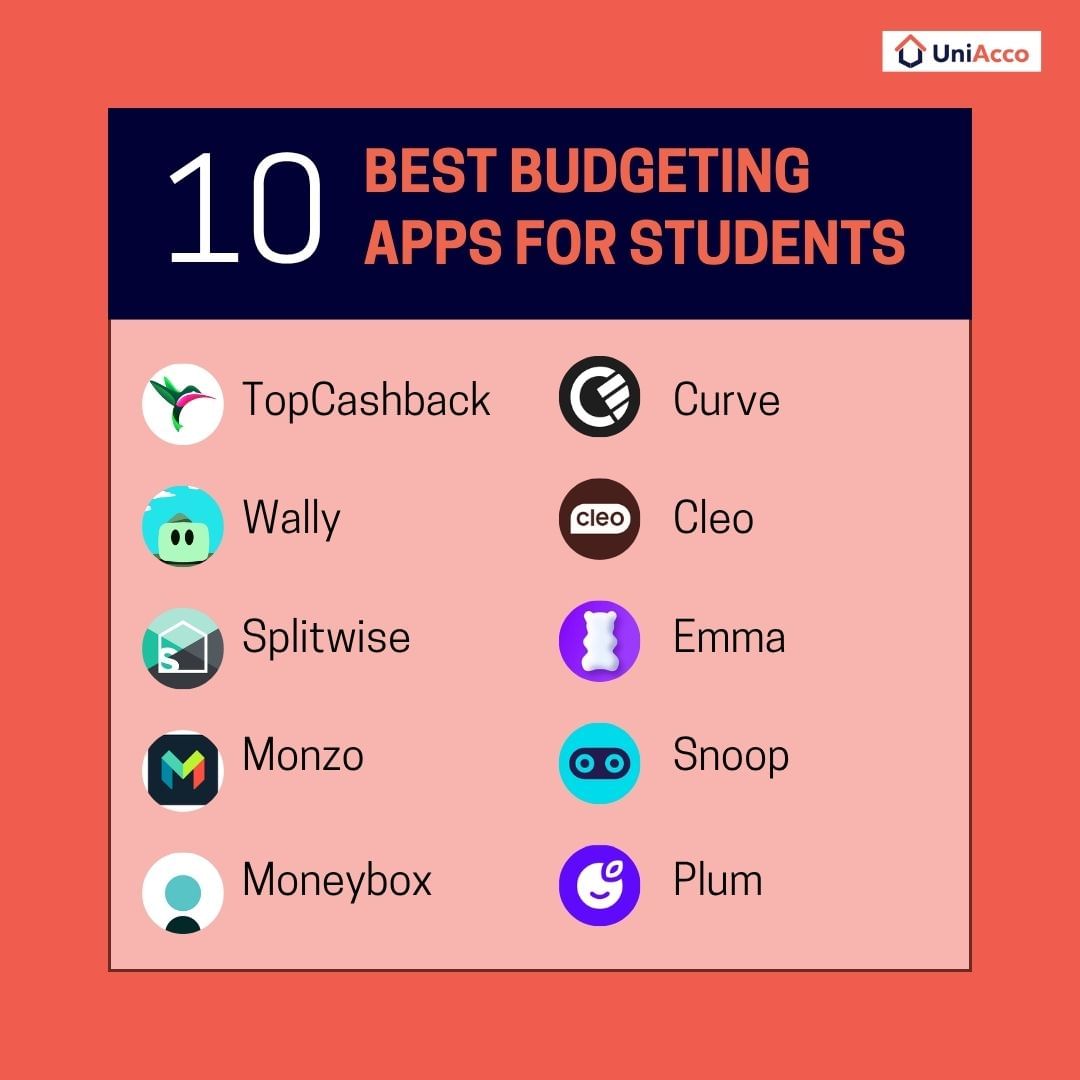
Top Cashback
If saving money feels like a stretch, TopCashback flips the script. This app rewards you for spending. Every time you shop with one of their 500+ partner brands, you earn cashback. From Tesco to ASOS, your essentials and indulgences start paying you back. That’s budgeting support in the background, without changing how you shop.
Why Does It Work for International Students?
- Helps offset everyday costs with cashback on routine purchases
- No complicated process—just shop, claim, and collect
- Cashback builds up over time and can be withdrawn anytime
- Especially useful for managing recurring essentials like groceries and clothing
Key Features
| Feature | Details |
| Partner Retailers | 500+ UK brands including Tesco, ASOS, Boots, Booking.com |
| Cashback Options | Online, in-store, and in-app purchases |
| Payout Methods | Bank transfer, PayPal, gift cards |
| Tracking Tools | In-app purchase history, cashback status updates |
| Account Types | Free and Plus Membership (Plus gives extra cashback and perks) |
Platforms and Ratings
Available On: iOS (App Store) and Android (Google Play)
App Store Rating: ★ 4.8 / 5
Google Play Rating: ★ 4.4 / 5
Cost
Free to use. No hidden charges, though standard mobile data rates may apply when not on Wi-Fi
Ideal For
Students who do a lot of online shopping and want small savings to stack up quietly over time.
Wally
Wally is your budgeting partner with a calendar. If you’re keen to understand your spending habits and make smarter choices, Wally gives you a clear starting point. It doesn’t just show numbers. It teaches you how to manage them. From setting savings goals to planning monthly bills, Wally gives your budget both structure and purpose.
Why Does It Work for International Students?
- Breaks down spending patterns so you can plan better
- Lets you set monthly reminders for recurring expenses like rent or society fees
- Helps you predict your future spending once essentials are covered
- The group feature simplifies bill-splitting with housemates
- Works across borders with access to 15,000+ banks in 70 countries
Key Features
| Feature | Details |
| Personal Finance Tools | Goal setting, budgeting insights, expense tracking |
| Calendar Functionality | Set payment reminders, plan expenses by date |
| Group Budgeting | Split bills with friends or flatmates |
| Global Access | Supports banks in 70+ countries |
| Insights Engine | Learns and adapts to your financial behaviour |
Platforms and Ratings
Available On: iOS App Store only
App Store Rating: ★ 4.5 / 5 (approx., may vary by region)
Cost
Free to use. Some advanced features may require in-app purchases
Ideal For
Students who want hands-on control over their budget, reminders for bills, and tools to help build better financial habits.
Splitwise
Tracking shared expenses doesn’t need to be a hassle. Splitwise simplifies cost-splitting, whether you’re living with flatmates, travelling with friends, or sharing everyday bills. Just log the expense, and the app calculates who owes what. You have clear, fair splits that keep everyone on the same page, eliminating the need to manage spreadsheets and deal with multiple reminders.
Why Does It Work for International Students?
- Ideal for shared living, society events, and group trips
- Tracks who paid what and calculates exact shares
- No need to chase anyone or argue over amounts
- Attaches receipts to keep things transparent
- Reduces tension in shared living situations
Key Features
| Feature | Details |
| Expense Splitting | Equally or unequally by share, amount, or percentage |
| Multi-Person Payments | Add multiple payers for a single expense |
| Recurring Bills | Create bills that repeat weekly, monthly, or yearly |
| Group Features | Shared totals, group photos, comments, and activity feed |
| Currency Support | 100+ currencies supported for global student groups |
Platforms and Ratings
Available On: iOS (App Store) and Android (Google Play)
App Store Rating: ★ 3.7 / 5
Google Play Rating: ★ 4.2 / 5
Cost
- Free Version: Includes all essential features
- Splitwise Pro: Paid upgrade with extras like currency conversion, receipt scanning, and no ads
Ideal For
Students living in shared accommodation or frequently splitting expenses with friends, partners, or flatmates.
Monzo
Monzo offers a full-service digital bank account with smart features designed for student life. It gives you real-time insights into your spending, helps you set monthly budgets, and tracks your financial habits with ease. One standout feature is the “Coin Jar,” which automatically rounds up transactions and saves the difference, making saving effortless.
Why Does It Work for International Students?
- Perfect for daily money management and saving habits
- Tracks every spend the moment it happens
- Lets you create separate Pots for rent, food, or trips
- Sends instant alerts to keep you informed
- Helps you build better spending habits over time
Key Features
| Feature | Details |
| Real-Time Tracking | See every transaction instantly as you spend |
| Spending Categories | Track what goes on food, travel, shopping, and more |
| Budgeting Tools | Set monthly targets and monitor progress |
| Coin Jar Savings | Rounds up every purchase and saves the difference |
| Bill Splitting | Instantly split costs with Monzo users in your contact list |
| Pots | Set aside money for specific goals or monthly expenses |
Platforms and Ratings
Available On: iOS (App Store) and Android (Google Play)
App Store Rating: ★ 4.8 / 5
Google Play Rating: ★ 4.6 / 5
Cost
Free Version: Full access to all essential banking and budgeting features
Monzo Plus & Premium: Paid plans with extras like credit score reports, interest on savings, and exclusive offers
Ideal For
Students who want to track spending, save automatically, and manage their bank account in one easy-to-use app.
Moneybox
Moneybox simplifies saving and investing, starting from just £1. Choose from savings or investment accounts, including options such as the Lifetime ISA or Help to Buy, which are ideal for building towards your first home or future financial goals. For short-term benefits, Moneybox also offers cashback at popular brands such as Deliveroo, allowing you to earn as you spend without changing your daily habits.
Why Does It Work for International Students?
- Start saving with as little as £1
- Offers cashback at brands students already use
- Helps plan for bigger goals like buying your first home
- Includes investment and ISA options
- Takes just minutes to set up and use
Key Features
| Feature | Details |
| £1 Sign-Up | Start saving or investing with a single pound |
| Lifetime & Help-to-Buy ISA | Save for your first home while earning government bonuses |
| Cashback Offers | Earn while you spend with partner brands |
| Flexible Accounts | Choose between savings and investment accounts |
| Goal Tracking | Set savings goals and track your progress |
Platforms and Ratings
Available On: iOS (App Store) and Android (Google Play)
App Store Rating: ★ 4.8 / 5
Google Play Rating: ★ 4.3 / 5
Cost
Free Version: Full access to savings features and cashback options
Paid Plans: Available for advanced investment tools and added benefits
Ideal For
Students who want to save smartly for both short-term spending and long-term goals like buying a home.
Curve
Curve consolidates all your debit, credit, and loyalty cards into a single app, simplifying how you manage your finances. By linking your existing cards to one Curve card, you can make payments without juggling multiple wallets. The app provides real-time spending tracking, helping you stay aware of where your money goes. Additionally, Curve offers a cashback feature that rewards 1% on purchases for the first 30 days, with opportunities to extend this through referrals.
Why Does It Work for International Students?
- Combines all your cards into one easy-to-use app
- Earn cashback on everyday purchases for 30 days
- Track spending by category, merchant, or card
- Referrals earn you extra cashback—ideal for student circles
- Makes money management simple while living abroad
Key Features
| Feature | Details |
| All-in-One Wallet | Connects debit, credit, and loyalty cards in one place |
| 1% Cashback | Earn cashback on almost all purchases in your first 30 days |
| Referral Rewards | Get 30 more cashback days per friend who signs up |
| Spend Tracking | See where every penny goes with real-time updates |
| Smart Rules | Set spending rules by merchant, card, or category |
Platforms and Ratings
Available On: iOS (App Store), Android (Google Play), and App Gallery
App Store Rating: ★ 4.6 / 5
Google Play Rating: ★ 3.9 / 5
Cost
Free Version: Includes card syncing, cashback, and spend tracking
Paid Plans: Optional upgrades with added perks and premium benefits
Ideal For
Students who want a single card for all payments, plus cashback and expense tracking in one clean app.
Cleo
Cleo is designed for students who need a friendly guide on managing money. It doesn’t just throw numbers at you. Instead, Cleo breaks down your spending into clear, simple updates. It cheers you on when you do well and offers tips to keep you on track. One fun feature is ‘smart save,’ which sets money aside automatically for your goals. Then there’s the ‘swear jar’, which is a playful way to fine yourself when you slip up on spending. Cleo makes budgeting less dull and more doable.
Why Does It Work for International Students?
- Clear, easy-to-understand spending summaries
- Encourages good habits with positive feedback
- Automated saving tools to help reach goals
- Fun features that make budgeting engaging
Key Features
| Feature | Details |
| Spending Insights | Simple, clear updates on where your money goes |
| ‘Hype’ Mode | Celebrates your wins and motivates good habits |
| Smart Save | Automatically saves small amounts towards your goals |
| Swear Jar | Fines you for overspending on things you want to cut back on |
| Chatbot Assistant | Offers advice and answers budgeting questions |
Platforms and Ratings
Available On: iOS (App Store) and Android (Google Play)
App Store Rating: ★ 4.6 / 5
Cost
Free Version: Access to core budgeting tools and saving features
Paid Plans: Additional perks and more personalised advice
Ideal For
Students who want a simple, supportive app to build better money habits and save smarter.
Emma
Emma links all your bank accounts, debit cards, and savings in one place. It gives you a clear picture of your finances without the hassle. The app tracks your spending closely, flags forgotten subscriptions, and helps you avoid unwanted charges. You can set budgets and receive smart money-saving tips. Emma makes managing student finances straightforward and stress-free.
Why Does It Work for International Students?
- Connects all bank accounts and cards for a full overview
- Alerts you about unused subscriptions draining your funds
- Sets budgets and offers tailored savings advice
- Lets you invest from just £1 in brands you care about
- Helps you build healthy financial habits early
Key Features
| Feature | Details |
| Multi-Account Sync | Connect bank accounts, debit cards, and savings in one app |
| Subscription Tracker | Identifies and flags forgotten or recurring payments |
| Budgeting Tools | Set spending limits and monitor your progress |
| Investment Options | Start investing with as little as £1 |
| Goal Setting | Create savings goals and track progress |
Platforms and Ratings
Available On: iOS (App Store) and Android (Google Play)
App Store Rating: ★ 4.6 / 5
Cost
Free Version: Includes essential budgeting and tracking tools
Paid Plans: Emma Ultimate, Pro, and Plus offer enhanced features and personalised support
Ideal For
Students who want a simple, all-in-one app to manage accounts, track spending, and start saving wisely.
Snoop
Snoop does more than monitor your spending; it uncovers ways to help you save. Understanding your financial patterns, the app suggests tailored savings opportunities like switching to more affordable energy plans or cancelling unused subscriptions. The app also monitors for any unusual transactions, providing an extra layer of security for your accounts. With Snoop, you can make your budget work harder and manage your money more effectively.
Why Does It Work for International Students?
- Connects all bank accounts and cards for a full overview
- Personalised tips to cut bills and save money
- Alerts you to suspicious transactions for peace of mind
- Tracks spending by category and merchant
- Offers exclusive deals and switching services
Key Features
| Feature | Details |
| Personalised Spend Analysis | Track spending by category or merchant, compare with last month |
| Budget Creation | Build budgets yourself or use Snoop’s smart suggestions |
| Account Syncing | Connect bank accounts and credit cards in one app |
| Bill and Subscription Alerts | Spot cheaper deals and subscription savings |
| Security Notifications | Alerts for unusual activity on your accounts |
Platforms and Ratings
Available On: iOS (App Store) and Android (Google Play)
App Store Rating: ★ 4.6 / 5
Cost
Free Version: Access budgeting, personalised tips, and spend tracking without any charge
Snoop Plus: Paid upgrade for advanced money management features at £4.99 per month or £39.99 per year
Ideal For
Students who want tailored money-saving advice alongside budgeting and spending control.
Plum
Plum simplifies saving by automating the process based on your spending patterns. It transfers small amounts into a savings pot without any effort on your part. In addition, Plum monitors your bills and spending habits, providing insights and investment options. For students who find saving challenging, Plum offers an easy and efficient way to build financial security.
Why Does It Work for International Students?
- Automates saving by analysing your spending patterns
- Tracks bills and alerts you to upcoming payments
- Offers investment options to grow your money
- Helps build saving habits without you needing to remember
- Simple setup and easy to use
Key Features
| Feature | Details |
| Automated Savings | Transfers small amounts into savings pots based on spending |
| Bill Tracking | Keeps tabs on bills and upcoming payments |
| Spending Analysis | Shows where your money goes and how to save |
| Investment Options | Allows you to invest from the app easily |
| Multiple Plans | Free basic plan plus paid upgrades for extra features |
Platforms and Ratings
Available On: iOS (App Store) and Android (Google Play)
App Store Rating: ★ 4.7 / 5
Cost
Basic Plan: Free, includes automated saving and investment features
Plus: £3.99 per month, adds more saving tools and insights
Boost: £7.99 per month, for advanced features and perks
Max: £11.99 per month, full access to all features and benefits
Ideal For
Students who want effortless saving with automation, plus control over bills and investments.
Best Budgeting Apps for Students in the UK – At a Glance
| App | What It Does Best | Best Suited for | Key Perks | Cost |
| TopCashback | Earns cashback on everyday spending | Students who shop online often and want passive savings | 500+ UK retailers, no change in shopping habits | Free / Plus Membership (optional) |
| Wally | Combines budgeting with calendar reminders | Students who need bill reminders and visual planning | Expense calendar, global bank support, goal setting | Free / In-app purchases |
| Splitwise | Splits group expenses clearly and fairly | Students who live with flatmates or split costs regularly | Tracks balances, multi-person payments, group history | Free / Splitwise Pro (optional) |
| Monzo | Offers full banking with smart budget tools | Students who want to budget, save, and bank in one place | Coin Jar saving, instant spend alerts, Pots | Free / Monzo Plus & Premium tiers |
| Moneybox | Helps save & invest, starting with just £1 | Students who want to grow savings effortlessly | Lifetime ISA, cashback offers, auto-investing | Free / Paid plans available |
| Curve | Merges all cards into one, with cashback | Students who use many cards and want simplicity | 1% cashback (first 30 days), referrals, smart tracking | Free / Paid plans optional |
| Cleo | Makes budgeting fun and automated | Students who struggle with saving and want motivation | Smart Save, Hype mode, Swear Jar | Free / Paid upgrades available |
| Emma | Gives a full view of your finances | Students who have multiple accounts or subscriptions | Syncs accounts, flags charges, sets budgets | Free / Emma Pro, Plus, Ultimate |
| Snoop | Spots savings based on spending behaviour | Students who want money-saving tips tailored to their habits | Bill alerts, category tracking, spending insights | Free / Snoop Plus (£4.99/month) |
| Plum | Saves automatically based on your behaviour | Students who want savings without having to think about it | AI savings, investment tools, bill tracking | Free / £3.99–£11.99 tiers |
Tips for Making the Most Out of Budgeting Apps
Budgeting apps can help you take control of your money, but only if you use them with intent. As an international student settling into life in the UK, your daily spending, savings goals, and even currency habits may shift. The right app can support you through all of it. Here’s how to make every feature work in your favour.
Define Your Financial Priorities Early
Before you start using any budgeting app, ask yourself what matters most: monthly savings, expense tracking, or avoiding overdrafts? Once your priorities are clear, it’s easier to choose and customise the right tool.
For instance, if your goal is to save for your next rent cycle, apps like Plum or Moneybox can automate small contributions towards that target.
Sync Your Accounts and Categorise Clearly
Link your bank accounts, debit cards, savings pots, and even investment accounts. This gives your budgeting app a complete picture of your finances, helping it generate more accurate insights.
Then, categorise your spending accurately from the start. Clear categories help the app track your habits and highlight where to save. Apps like Emma and Monzo make this easy with smart tagging and real-time syncing.
Automate What You Can and Earn While You Spend
If you struggle to save consistently, let the app do it for you. Use round-up features or set fixed weekly contributions into savings pots. Tools like Coin Jar in Monzo or Smart Save in Cleo make it easier to build a cushion, even on a tight student budget.
Pair this with cashback tools in apps like Curve or TopCashback to earn as you spend. You’ll build savings in the background while sticking to your routine.
Stay Proactive With Alerts and Weekly Reviews
Budgeting apps for students in the UK offer real-time alerts for spending, low balances, or bill payments. These small nudges can prevent overspending before it happens. With apps like Curve and Snoop, you can even set spending limits and receive instant updates as you go.
Additionally, instead of waiting until the end of the month, make it a habit to review your spending on a weekly basis. This gives you more control and time to adjust if needed. Most student budgeting apps offer weekly summaries or insights dashboards to help you stay on track without feeling overwhelmed.
Track and Cancel Unused Subscriptions
Many students sign up for trials or streaming services and forget about them. Use your app’s subscription tracker to catch any ongoing charges you don’t use. Emma, for example, alerts you to forgotten subscriptions and helps you cancel them before the next billing cycle.
Use Group Features for Shared Expenses
If you live in shared housing or split bills often, use apps like Splitwise to keep everything clear and fair. Add each expense as it happens to avoid confusion later. This keeps everyone on the same page and reduces awkward follow-ups at the end of the month.
Revisit and Adjust Budgets Regularly
Budgets shouldn’t stay fixed forever. Update your limits when your schedule, living situation, or part-time income changes. Reviewing your budget at the start of each term helps ensure it reflects your current priorities and prevents overspending in categories you no longer use.
Wrapping Up!
Budgeting isn’t about cutting back on everything; it’s about spending with purpose. With the right tools, you can build habits that support your lifestyle without constant stress. Whether you’re splitting rent, saving for a trip, or just trying to make your loan stretch a bit further, each budgeting app gives you more control, not more rules.
Choose one that suits your lifestyle, not just your spending habits. Use it consistently, stay informed, and adjust as you go. Because studying abroad is a big step, and the way you manage your money can make all the difference.
And if you’re still searching for the right student accommodation in the UK, one that fits your budget without compromising comfort, UniAcco can help you compare, shortlist, and book from verified options across top UK cities.
For more ways to make your student budget work harder, explore these practical guides packed with useful advice
Frequently Asked Questions
1. What is a budgeting app and how does it help students?
A budgeting app for students is a money management tool that tracks your income, spending, and savings in one place. These apps link with your bank accounts to give real-time updates and help you plan monthly budgets. Whether you’re living on student loans or part-time income, the right app helps you make smarter decisions every day.
2. Which is the best budgeting app for students in the UK?
The best budgeting app for students in the UK depends on your needs. Apps like Monzo are ideal for daily money tracking, while Plum and Cleo help automate savings. For shared living, Splitwise makes bill-splitting simple. Choose a tool that fits your lifestyle, not just your budget.
3. Are student budgeting apps safe to use?
Yes, student budgeting apps use encrypted connections and secure servers to protect your financial data. Stick to well-known apps with high ratings, read privacy terms, and avoid sharing sensitive data with lesser-known tools.
4. Can a budgeting app help students save money?
Absolutely. Many apps include features like round-up saving, automated transfers, or cashback rewards. Apps like Plum or Moneybox can set money aside without any extra effort, helping students build savings in the background.
5. Are budgeting apps useful for international students in the UK?
Yes, budgeting apps for international students are handy. They help track expenses in British pounds, manage different income sources, and sometimes even support multiple currencies. Apps like Emma and Snoop can also spot hidden charges or unused subscriptions, great for avoiding wasteful spending in a new country.


 LinkedIn








Great insights! These budgeting apps are perfect for students managing expenses abroad.