
Applying for your UK visa is only half the journey. The real test begins once you’ve submitted your documents and started waiting for a decision. Every student reaches the same point: Has my application moved? Has UKVI made a decision? Did I miss an email? If you’re trying to figure out how to check UK student visa status online, this blog walks you through the official ways to track your application, understand your updates, and know what to do if processing takes longer than expected.
Checking UK Student Visa Status Online: An Overview
| If you want to… | Do this… |
| Check your visa application status | Sign in to the same system you used to apply (VFS/TLS portal or UKVI account) and use your application reference to view basic status updates |
| Know whether your visa has been approved | Watch for the official decision email, then confirm the outcome in your visa application centre tracker or UKVI online account once a “decision made” update appears. |
| Understand how long processing takes | Use the GOV.UK visa processing time checker and student visa guidance to see typical timelines based on where and how you applied. |
| View your immigration status after approval | After a decision, log in to your UKVI account to view your eVisa, which shows your visa conditions and expiry date. (Older visa holders who still have a physical BRP can also refer to it, but new student visa applicants receive an eVisa only.) |
| Resolve delays | Compare your wait with official processing times, then contact UKVI or your visa application centre with your reference number if you are well beyond the usual timeframe. |
Can You Check Your UK Student Visa Status Online?
Yes, but not through one specific way. There isn’t a universal tracking system for checking the status of your UK visa. This completely depends on how you’ve applied for it. If you’ve applied via the VFS Global website, you can track it there. The other option is a UKVI online account.
It is important for students to understand that application tracking and eVisa access are two different things.
| What you want to check | Where to check |
| Application progress | Your visa application centre’s online tracking service such as VFS Global. |
| Updates on your application | Email or SMS notifications (if opted in) |
| Visa decision | Official communication from UKVI or your application centre |
| Immigration status after approval | Your UKVI account (for eVisa holders) |
Ways to Check Your UK Student Visa Status
Check Through Your Visa Application Centre
If you’re an overseas student, you can check your application status through the portal you applied through. This can be via VFS Global or TLScontact. You’ll receive an application reference number (often called the GWF number) when you apply. To track your status, enter this along with your surname and other basic details like phone number or email.
Monitor Email Updates from UKVI
Your entire journey or progress will be sent to the email address you used to fill out the application form. These are crucial email updates, such as when your application has been forwarded to UKVI, when a decision has been made, and when your passport or decision letter is ready for collection or delivery.
Use SMS Notifications (If Available)
Some visa application centres offer optional SMS alerts for a small fee. If you opt for this service, you’ll get short text messages when your application status changes, for example, when your documents reach UKVI and when a decision has been returned to the centre. This doesn’t replace email or online tracking, but it’s a handy extra layer of reassurance if you’re away from your laptop.
Sign In to Your UKVI Account
If you have applied through your UKVI account, you just have to sign in to your account; this will be linked to your application. You’ll see any updates, messages, and decision notices there, and once approved, you can also view your eVisa and immigration status. Later on, this account will be your go-to place to check for permission to stay in the UK. You can generate a code and send it to your universities, landlords, or employers.
Contact UKVI or Your Visa Application Centre
However, if it has taken quite some time to hear back or the website isn’t showing progress, you can always reach out to UKVI or your visa application centre to get a clear answer on the status of your application. Keep your personal information ready, such as your UK student visa tracking number or personal details for verification.
How to Check UK Student Visa Status Online?
Locate your application reference number.
Your application number, also known as the GWF number, will be on your confirmation email receipt. This number will be needed to track your application online.
Open your visa application centre’s tracking page.
Go to the “Track your application” section on the VFS Global or TLScontact website.
Enter the required details.
Type in your reference number, surname, and any other information requested (such as date of birth or passport number), then click on submit.
Review your current application status.
Check the status displayed on the portal – for example, “Application received”, “Under process”, or “Decision made”.
Monitor your email regularly.
All official decisions or important updates will be sent to your email address. Keep an eye on any email received by UKVI or your chosen application centre.
Log in to your UKVI account after approval (if applicable).
Once your student visa is granted, sign in to your UKVI account to view your eVisa and immigration status online, check your visa conditions, and generate a share code when you need to prove your right to study, work or rent in the UK.
Booking your student accommodation in the UK should be simple. With UniAcco, you can explore verified student housing, compare your options, and receive expert guidance every step of the way to make your booking hassle-free.
🔍 Connect with UniAcco ExpertsUnderstanding UK Student Visa Application Statuses
| Application Status | What It Usually Means |
| Application received | Your application and biometrics have been submitted and logged by the visa centre or UKVI. |
| Under consideration | UKVI is currently reviewing your documents, finances and CAS. |
| Additional documents requested | UKVI or the visa application centre needs extra evidence (for example, financial proof or a new CAS) before they can make a decision. |
| Decision made | UKVI has reached a decision on your application and the result is being sent back to your visa application centre or directly to you by email or letter. The tracker may not show “approved” or “refused” until you receive the official notice. |
| Passport ready or application complete | Your passport or decision letter is ready for collection or has been dispatched. |
UK Student Visa Processing Times
Standard UK student visa applications usually take 3 weeks (15 working days) after you verify your identity, although this can stretch to 4-6 weeks in peak season. Students who need it on priority can opt for the Priority or Super Priority services where you can get a faster decision, sometimes under 5 working days or by the next working day, depending on the service and how you prove your identity.
| Application Type | Typical Processing Time* |
| Standard Student Visa | 15 Working Days |
| Priority Service (where available) | Less Than 5 Working Days |
| Super Priority Service (where available) | The Next Working Day |
Factors Affecting Timelines
Peak admission seasons
While the student visa processing time takes 15 working days, applications sent during peak seasons, when major intakes are open (June to September), may take 4-6 weeks until you hear an answer.
Incomplete documents
Missing bank statements, incorrect CAS application, or unclear maintenance funds can cause a delay in your application. UKVI may pause your documentation until you provide the correct documents.
Identity verification
Your biometrics or identity verification checks are crucial. If there are any issues with your visa application centre, or if you’ve missed the appointment for ID verification, it can cause delays.
Additional checks
Some applications trigger extra security, financial or academic checks, for example, where information needs to be verified, or risk‑based assessments require more scrutiny.
Public holidays
Applications submitted during UK holidays or even your local holidays may cause delays, as the official personnel will only resume work after the holidays end.
What to Do If Your UK Student Visa Application Is Delayed?
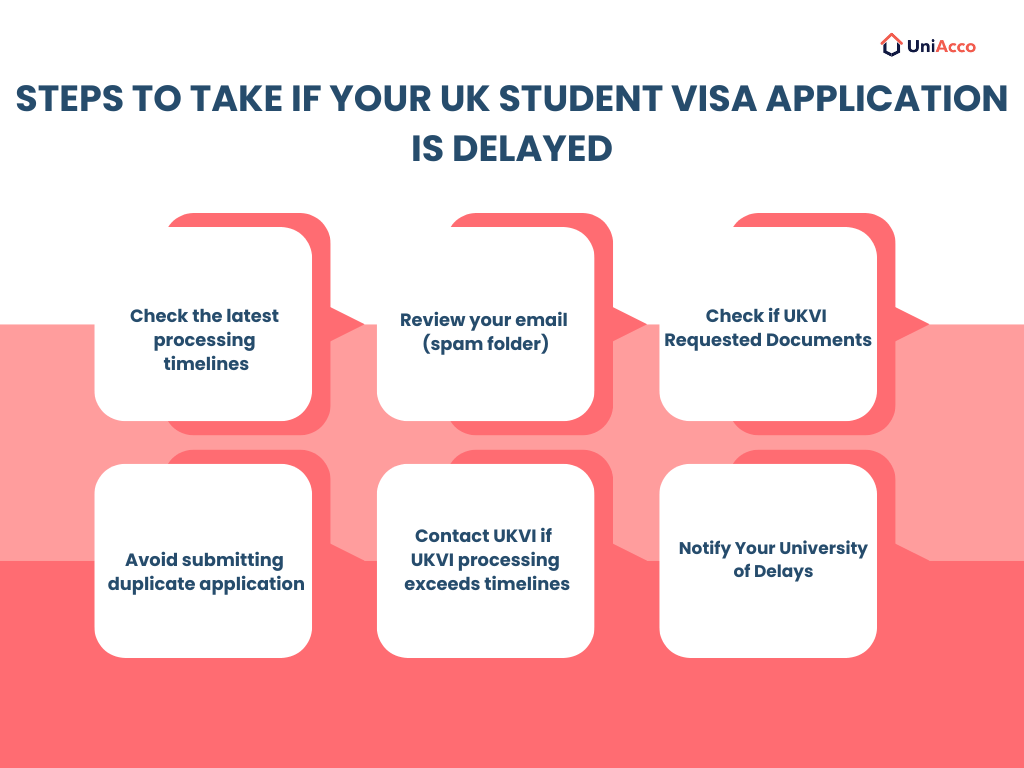
Check the latest processing timelines.
Based on your service type, your processing timelines may differ. If you choose to go through the standard route, keep a buffer period of 4-6 weeks. For updated timelines, GOV.UK’s website will help you understand better.
Review your email (including spam folders).
Look for messages from UKVI or your visa application centre confirming a decision or asking for more information. Keep checking your spam folder as well, as some messages may not make it to your primary folder.
Confirm whether UKVI has requested additional documents.
Keep logging into your UKVI account to stay updated on any new requests that may come up. If you do find anything, submit it as soon as possible.
Avoid submitting a duplicate application.
Do not file a second student visa application just because you’re anxious about the wait. This can complicate matters and may even slow things down further unless UKVI specifically advises you to reapply.
Contact your visa application centre or UKVI if the standard processing period has passed.
Once you’ve passed the standard processing date, contact your centre or UKVI with your reference number, biometrics date and visa route. They will help you with the status of your application.
Inform your university if your arrival may be delayed.
Email your university’s international office or admissions team as soon as you suspect you might arrive late. They will advise on late registration windows and the next steps you can take.
Setting Up Your UKVI Account and eVisa
eVisa is your digital record of immigration status. This is an online entry that proves your identity, visa type, work or study conditions and the expiry date. This can be accessed through your UKVI account.
If you’re applying for a UK student visa now, you’ll receive an eVisa rather than a physical BRP. The Home Office completed this shift for new applicants in late 2025. This applies whether you’re a student, worker or family member. You’ll typically confirm your identity through the UK Immigration: ID Check app as part of getting your eVisa set up.
How to Create Your UKVI Account?
- Go to the official “Create a UKVI account” service on GOV.UK, usually linked in the email or letter inviting you to set up your account.
- Enter your email address and mobile phone number, then verify them with the security codes sent to you.
- Provide one of the requested identifiers, such as your passport number or visa application number (GWF/UAN), so your account can be linked to your immigration record.
Once created, you’ll be asked to confirm your identity (often using the UK Immigration: ID Check app or similar process) and link the account to your eVisa.
How to Access and Share Your Immigration Status?
- View your immigration status.
Sign in to your UKVI account and use the “View and prove your immigration status” service to check your visa details.
- Generate a share code.
You’ll get an option to generate a code. This code proves your status to universities, landlords, or employers. They can then use this code to securely check your right to study, work or rent in the UK.
- Keep your details up to date.
Update all your personal details, such as your passport information, so your eVisa always reflects the document you travel with, and your current circumstances.
Common Reasons You May Not Be Able to Track Your Application
| Issue | Possible Solution |
| Incorrect application reference | Verify the reference provided after submission. |
| Name mismatch | Enter your details exactly as shown on your application. |
| Status not updated | Wait for the system to refresh. The updates may not appear immediately. |
| Technical issue | Try again later or contact your application centre. |
Common Mistakes That Can Delay Your Student Visa Application In The UK
Incomplete financial evidence
Your documents could be missing some important bank details, or you have failed to submit your maintenance funds. This can cause a delay in your visa, or your application may be kept on hold until you submit all of the documents properly.
Incorrect CAS information
Always ensure the details on your CAS match your personal details. Even a letter here and there can cause issues. So double and triple check everything before submitting.
Missing supporting documents
If you forget to upload supporting documents such as academic transcripts, consent letters, or certified copies, then your application will be held until all the documents are provided.
Delayed biometric appointment
Your visa application cannot move forward until your identity has been verified, either through biometrics or the UK Immigration: ID Check app. A delayed, missed or rescheduled appointment can push your application outside the usual processing window.
Failure to respond to UKVI requests
If UKVI asks for extra documents or clarification, you need to respond promptly. Leaving the request unanswered can freeze your application while the team waits for the information they need to continue assessing your case.
Passport inconsistencies
Your passport details must match every other part of your application, including your CAS, bank evidence and visa form. An expired, damaged or inconsistently scanned passport can raise questions and delay the decision.
It is actually easy for students to check their student visa status online. Once you have the login details and GWF number, all you have to do is be patient and wait until the results come out. Submitting complete, accurate documents gives you the best chance of approval. In the end, it is all an experience and a start of your UK journey as a student.
The doors to the UK are open—now it’s time to secure your student home. Explore verified, fully furnished student accommodation with UniAcco and book your ideal stay before the best rooms are gone.
🔍 Book Your Student Accommodation

 LinkedIn









0 Comments